Your no-nonsense guide to modern AI
Straightforward starters for the latest flagship models and tools that actually move the needle — because life's too short for 47-page tutorials. From a consultant who's shipped real results.
AI moves fast; here's the distilled version that works today (September 2026). We cover the frontier models first, then practical tools and my own workflow for turning ideas into live products overnight.
The four models worth knowing right now, with free access tips and pro prompts you can copy-paste today.
GROK 4.6 — XAI
xAI's real-time, no-filter contender, now aimed squarely at coding. Access via grok.com or X. 500K token context and $2/$6 per million tokens — still the cheapest frontier model on this list by a wide margin. 4.6 keeps every spec from 4.5 and spends the whole upgrade on capability.
4.6 is API-only so far — grok.com and the app are still on 4.5. Check which one you're actually talking to.
Give me the unvarnished latest on [current event].
Skip the caveats; I want signal, not noise.CLAUDE OPUS 5 — ANTHROPIC
Anthropic's precision agent for complex tasks. Free tier at claude.ai. Opus 5 is now the default everywhere — 96.0% on SWE-bench Verified, 1M context, and it verifies its own work instead of declaring victory early. Same $5/$25 as Opus 4.8, half of Fable 5's input cost.
Fable 5 is still the ceiling, but Opus 5 matches it on most benchmarks for half the price. Easy call.
Debug this large codebase and suggest refactors.
Prioritize by impact-to-effort ratio.
Flag any security concerns you spot.GEMINI 3.7 FLASH — GOOGLE
Google's multimodal workhorse. Free at gemini.google.com. 3.7 Flash landed in August at roughly half the price of 3.6 — Google's most capable Flash yet. Nano Banana still makes it the best image generator in the group — more on that below.
Gemini 3.5 Pro is still vaporware. 3.1 Pro from February is the top Pro tier you can actually run.
Analyze this uploaded chart and forecast trends
for the next two quarters. Flag assumptions
you're least confident about.GPT-5.6 SOL — OPENAI
OpenAI's flagship for reasoning and agentic work. Free access at chat.openai.com. Three tiers now: Sol for hard problems, Terra for everyday, Luna for volume. All share a 1.05M token context and 128K output, and Sol leads the Coding Agent Index.
Sol is paid-only. Free chat still defaults to GPT-5.5 Instant, so "I use ChatGPT" doesn't mean what it used to.
Plan a complete marketing strategy for a SaaS launch,
including contingencies for each stage.
Start with the riskiest assumptions.The tools that multiply your output. All free to start, all unreasonably effective.
STRUCTURED CODING AGENT — NOW ON OPUS 5
Claude's strength is in structured coding, and Claude Code runs Opus 5 by default now. Prompt in claude.ai and iterate ruthlessly — it plans better than most humans, and it actually re-checks its work before telling you it's done.
Yes, an AI helped build this very page. The recursion isn't lost on me.
Write a responsive landing page in HTML/Tailwind,
then optimize for SEO. Follow up with:
"Make this version load under 1 second."GEMINI 3.1 FLASH IMAGE ENGINE
Google's Gemini-powered image generation and editing beast. Access via gemini.google.com — pick "Create images" from the tools menu, then Fast, Thinking, or Pro. Reach for Pro (Nano Banana Pro) when you need 4K or typography that has to be legible; a Lite variant landed in June if you're generating at volume. It renders crisp text and handles complex edits like few others — ideal for mockups that look shipped.
The name is ridiculous. The output is not.
Generate a professional infographic for AI consulting
services with legible multi-language text.
Use a clean, modern color palette.SCREEN-AWARE CLAUDE FOR MAC + WINDOWS
Anthropic's native app for Mac and Windows — download from claude.ai/download. The killer feature is Cowork mode: Claude watches your screen and contributes in real-time. I lean on it for client cowork sessions and remote pairing — a dedicated window beats a browser tab when you're switching between apps for hours.
It's the difference between "a tool I open" and "the thing that's always there."
I'm sharing my screen for the next 20 minutes.
Watch what I do, flag inefficiencies,
and call out any wheel I'm reinventing.How I (and Nisius clients) spin up production projects in hours. I run paid tiers across the board, but every tool below has a free tier that's more than enough to get your feet wet — start there, upgrade when it starts making you money.
Start in Grok to research the topic, competitor landscape, and target audience. Go back and forth — challenge its assumptions, refine the scope, nail down exactly what the project needs to do. Once the vision is sharp, have Grok write a detailed Claude Code prompt covering structure, content, styling, and functionality.
Grok's job is to think. Claude's job is to build. Splitting those roles is the unlock. See the real prompt I used to kick off this very site below.
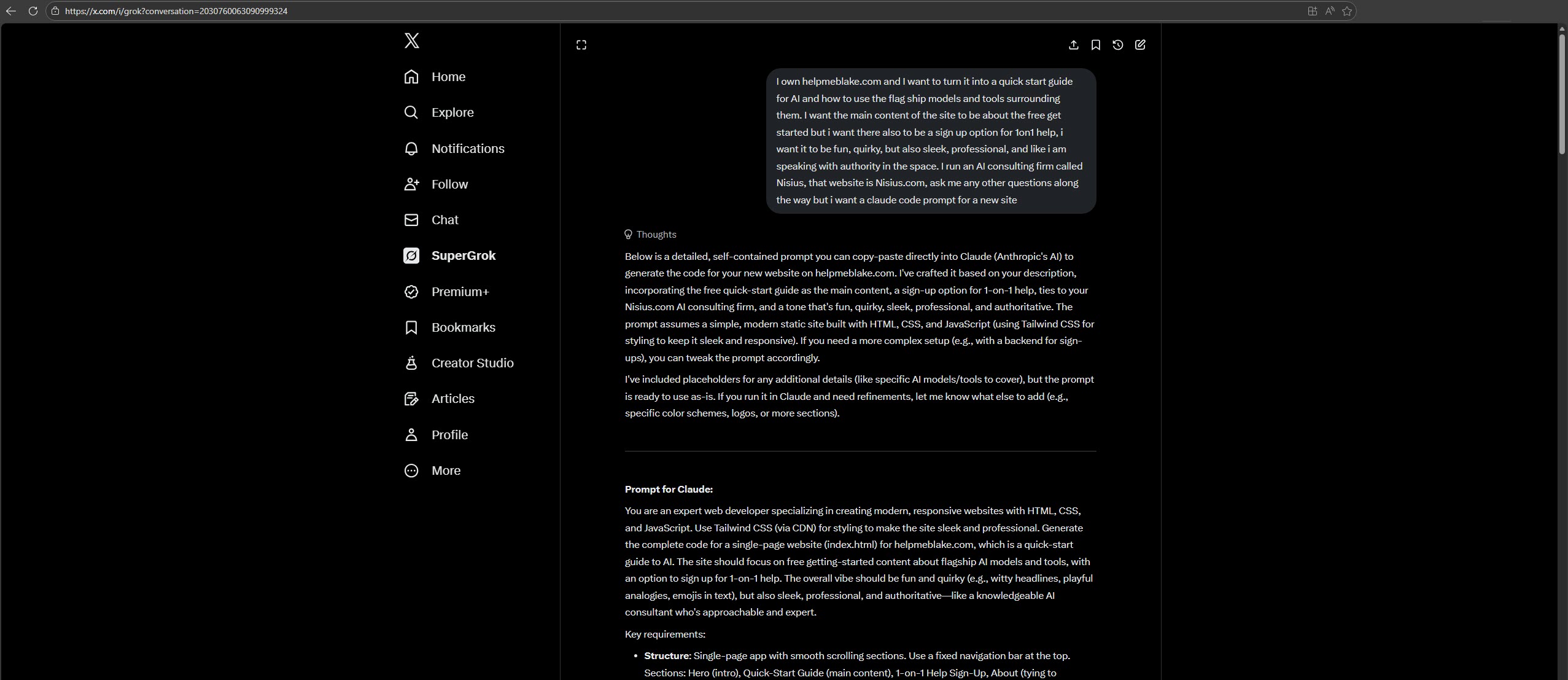
Visual Studio Code with the Claude Code extension — not Copilot, not a chatbot sidebar. Claude Code operates as a full coding agent inside your editor: it reads your files, writes code, runs commands, and iterates autonomously. This is where the actual building happens.

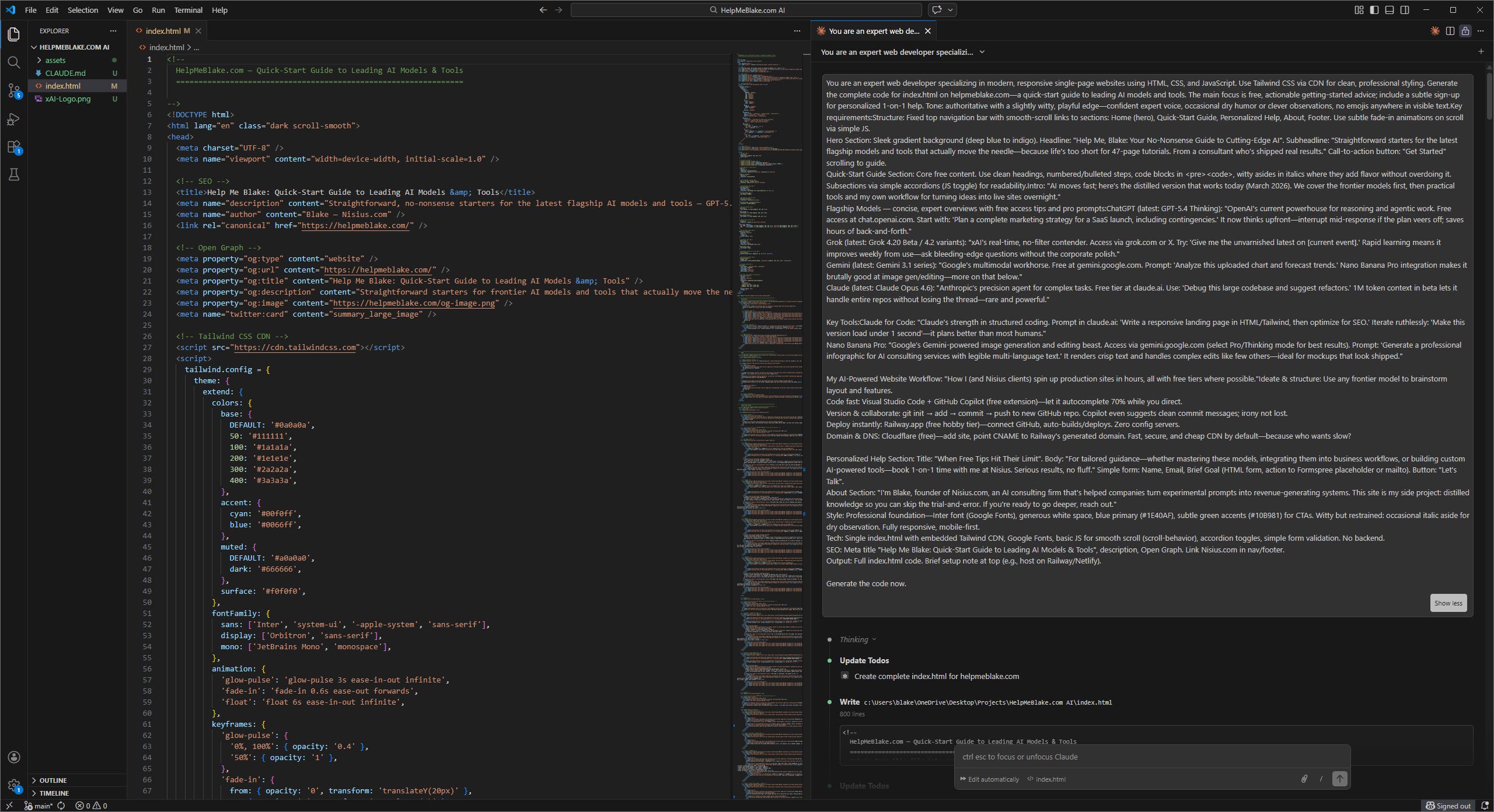
Before pasting the Grok prompt, I populate a CLAUDE.md file in the project root. This is Claude Code's custom instruction file — it reads it automatically on every interaction. Mine contains project structure, naming conventions, the design system (colors, fonts, spacing), tech stack preferences, and rules like "no emojis" or "match Nisius.com styling." Think of it as a creative brief that never expires.
Pro tip: steal this idea. A good CLAUDE.md is the difference between "rewrite everything" and "ship it."
# Example CLAUDE.md structure:
- Project: Single-page app, HTML + Tailwind CDN
- Design: Light-first, dark as a peer theme. All color
  via CSS custom properties in tokens.css — no raw hex.
- Brand: One green, rationed. Solid fill or 2px rule only.
- Fonts: Inter for everything. Mono for code blocks only.
- Style: Bordered cards, banded sections, no glows/gradients
- Rules: No emojis, mobile-first, match nisius.comDrop the Grok-generated prompt into Claude Code and let it build the first pass. Then go back and forth: refine the layout, adjust logic, tweak interactions, fix edge cases. Claude reads the CLAUDE.md context on every turn, so it stays on-brand without you repeating yourself. This is where 80% of the magic happens — rapid iteration with an agent that remembers everything.
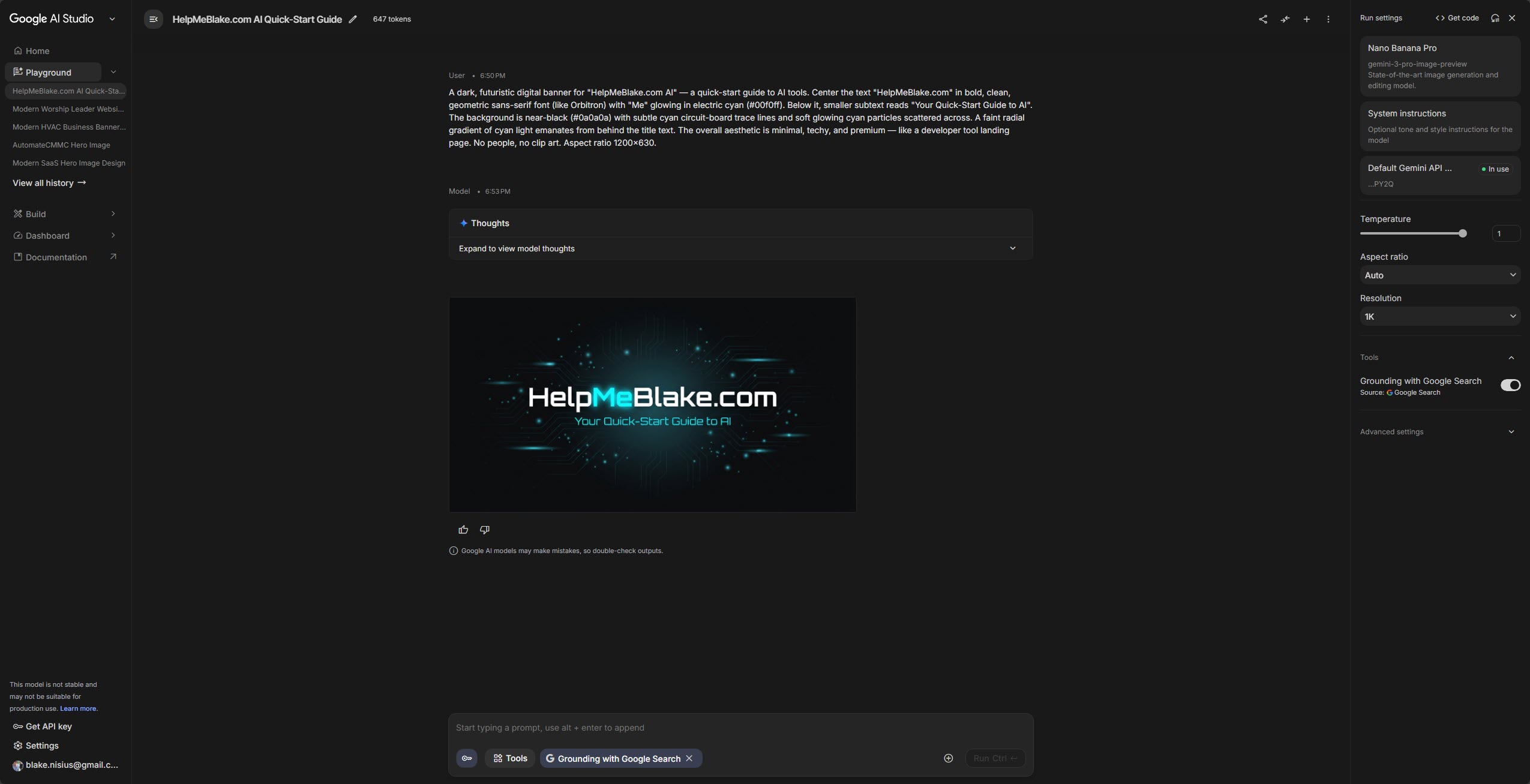
Once the project is built, I have Claude write a Nano Banana 2 prompt that matches the project's exact style and theme — colors, mood, typography cues, everything. Then I paste that prompt into Gemini (Pro/Thinking mode) to generate on-brand hero images, icons, or infographics. AI writing prompts for other AI. We're deep in the recursion now.
The output is consistently better than anything I'd describe from scratch. Claude just knows what Claude built.
Prompt

Output
Commit and push to a new GitHub repo. Claude Code can handle the git commands for you if you ask — init, add, commit, push, the works.
git init
git add .
git commit -m "Initial build: AI-powered project"
git remote add origin https://github.com/you/your-repo.git
git push -u origin mainRailway.app — connect your GitHub repo, and it auto-builds and deploys on every push. Zero config, zero server management. Your project is live before your coffee gets cold.
Every future git push triggers a new deploy. That's it — no CI/CD to configure.
Full walkthrough: Railway Deployment Docs
Cloudflare — add your domain, point a CNAME to Railway's generated URL. You get a global CDN, SSL, and DDoS protection out of the box.
Because who wants slow?
# In Cloudflare DNS settings:
Type: CNAME
Name: @  (or www)
Target: your-app.up.railway.app
Proxy: DNS only (grey cloud)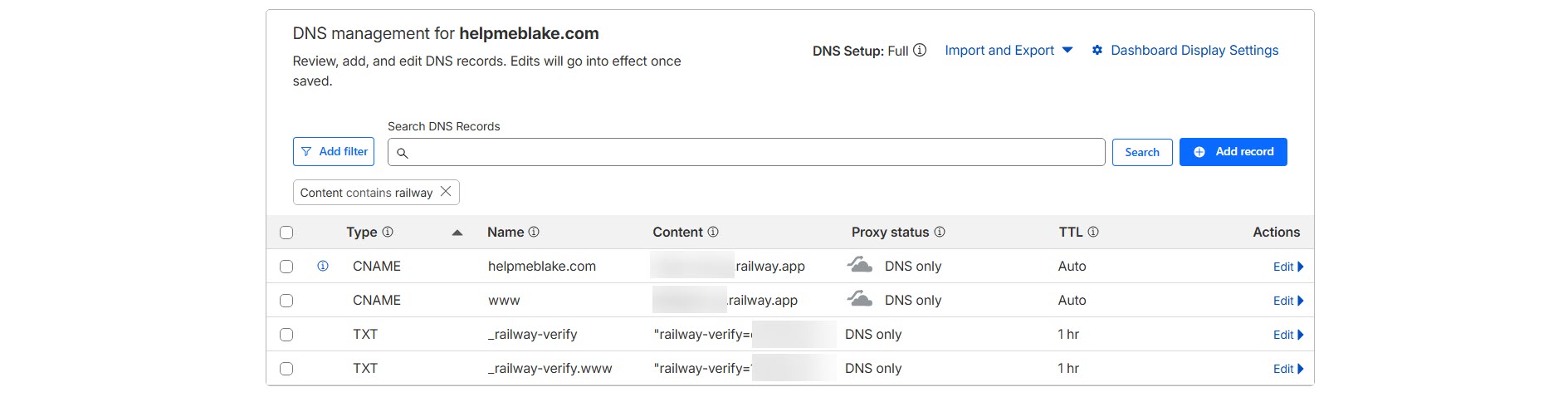
 Beyond the Guide
22 prompts grouped by the job you're doing, each one saying what it's for and what to change. Plus the 12 prompting habits that used to work and now actively hurt on current models, a one-page model cheat sheet, and my CLAUDE.md template. Free, no drip campaign, unsubscribe whenever.
Already know what you need? Book a session →
I'm Blake, founder of Nisius.com, an AI consulting firm that's helped companies turn experimental prompts into revenue-generating systems.
This site is my side project: distilled knowledge so you can skip the trial-and-error. Every model overview, prompt, and workflow on this page comes from actual client engagements — not hypothetical benchmarks.
If you're ready to go deeper, reach out. I don't bite. I do, however, send invoices.